

Enterprise meeting and process intelligence
Reco turns corporate discussions into structured documentation, auditable decisions and action plans — straight from your Microsoft Teams recordings, with AI grounded in evidence.
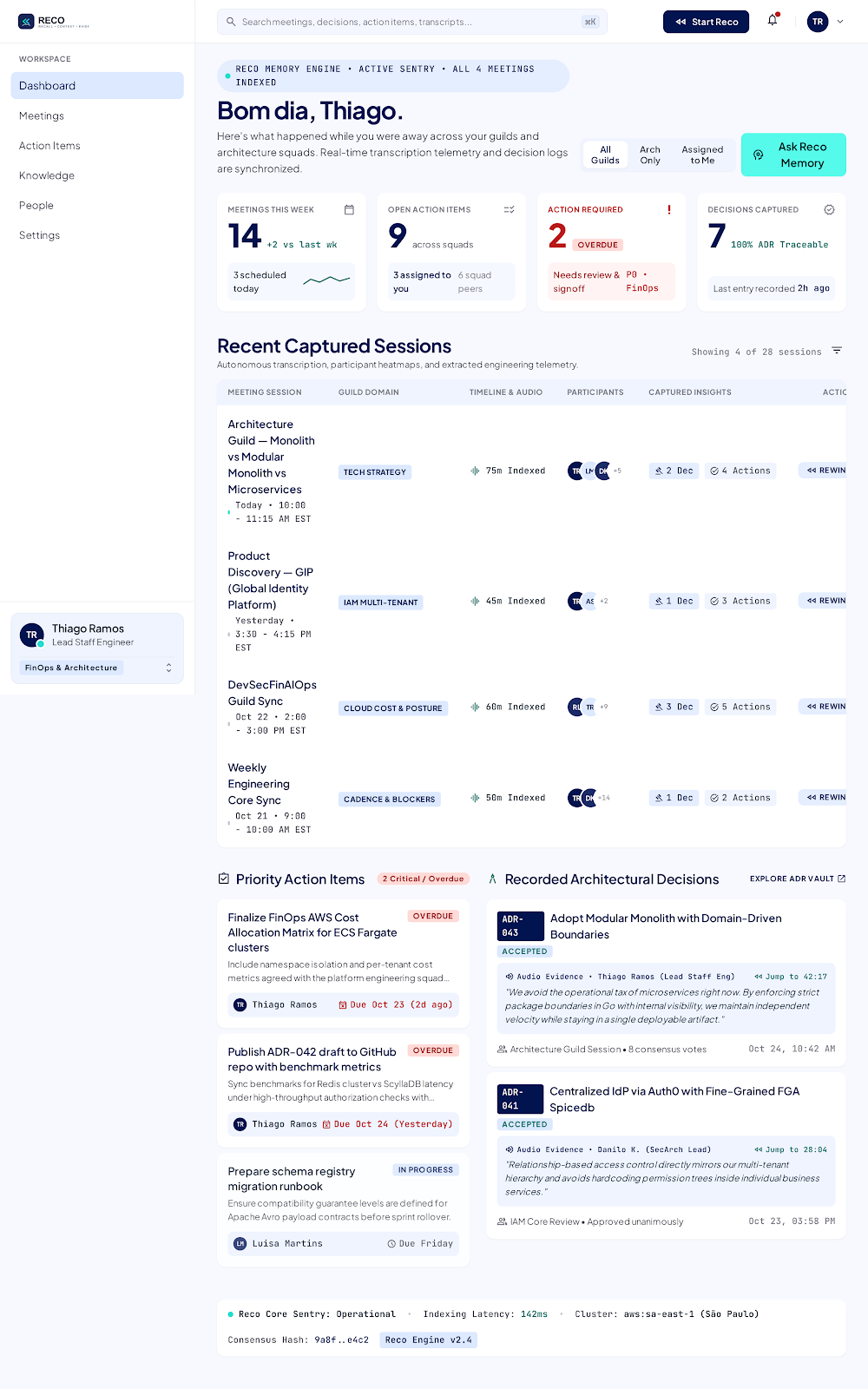
Hours of meetings. Almost no organizational memory.
Companies lose thousands of hours every week in strategic, technical and operational meetings — and the knowledge they produce fades within weeks.
Incomplete manual minutes
Shallow, and dependent on the time and interpretation of whoever took notes.
Forgotten decisions
Business rules and important decisions get lost, causing rework and misalignment between teams.
No traceability
Who approved it? When was it discussed? What was the rationale? Nobody remembers.
“Speaker 1”, “Participant 2”
Generic transcribers deliver walls of text with anonymous speakers.
Not just another transcriber. Living documentation.
Reco ingests recordings from Teams/SharePoint or local files, transcribes them accurately and uses generative AI — with the model of your choice, via Azure AI Foundry or OpenAI — to extract what really matters.
Every meeting, extracted with the right focus
Meetings have different purposes. Configure Meeting Types with specialized focuses and Reco extracts exactly what matters for each context.
- Decisions, business rules, process steps and exception cases
- Action plans assigned by name to each participant
- Create your own focuses, with custom instructions and extraction fields
- Technical decisions and rationaleDECISION
- Pros and cons of each optionANALYSIS
- Risks and dependenciesRISK
- Improvements to carry outACTION
- Operational flow stepsFLOW
- Business rulesRULE
- Systems and screens involvedSYSTEM
- Exception casesEXCEPTION
- Customer pain pointsPAIN
- Mapped objectionsOBJECTION
- Integration requirementsREQUIREMENT
- Commercial next stepsACTION
- Strategic deliberationsDECISION
- Budget approvalsAPPROVAL
- Who is responsible for whatOWNERS
Know exactly who said what
Reco combines accurate speech transcription with each participant’s corporate identity in Microsoft Teams/365, matching the time of each remark with who was on the call.
- Generic labels replaced by the real names authenticated in the call
- Auditable trail of who took each commitment or approved each decision
Anonymous speakers become identified colleagues, using their Microsoft work account.
From the decision straight to the exact second of the recording
A timeline connects speech to the extracted knowledge. Clicked a decision, rule or task? The player jumps to the moment it was discussed.
- One-click navigation to the evidence
- Text search with visual highlights during playback
Talk to your meeting. With sources.
Ask complex questions and get answers grounded in the transcript — with literal quotes and clickable timestamps to check at the source.
- Smart search that combines meaning and exact words, to find the right passage even in long meetings
- No made-up answers: every answer points to the part of the recording that proves it
- Chat history kept private for each user
From what was decided to what is being done
Action items leave the meeting and go straight to the tools your team already uses, with connectors for the leading task-management tools on the market.
 GitLab
 Azure DevOps
 Jira
Jira
 Linear
Custom integration
Linear
Custom integration
- Finalize the cost matrix by departmentOverdue
Thiago Ramos · due Oct 23
- Publish the approval policy draftIn progress
Luisa Martins · synced with Jira
Built to document processes, not just transcribe audio.
| Dimension | Typical transcribers | Reco |
|---|---|---|
| Goal | Generic minutes and plain-text summaries | Structured documentation of processes, systems and decisions |
| Speakers | “Speaker 1” or imprecise voice recognition | Real participant names, pulled from Microsoft 365 |
| Customization | Same summary for every meeting | Dynamic focuses: engineering, business, sales or committees |
| Traceability | Static text, disconnected from the video | Synced player with direct jumps to the evidence |
| Questions and answers | Generic summaries, with a risk of made-up answers | Answers with literal quotes and links to the exact moment in the recording |
| Privacy | Public service that retains your data | Data never used to train AI, minimal access to Microsoft 365 and full isolation between companies |
| Storage | Cost and custody stay with the vendor | Recordings stay in your company’s SharePoint — no extra storage cost |
Built for fast approval by information security teams.
Security and privacy from day one, not as an afterthought.
Minimal access to Microsoft 365
Reco only accesses what your company authorizes, with no broad permission over your whole environment. Recordings stay only in the folder approved by the customer.
Your data never trains AI
No data or transcript is used to train public OpenAI or Microsoft models (Zero Data Retention).
Personal data protection
Personal data, ID numbers, credentials and sensitive e-mails are automatically masked before being stored.
Each company’s data kept separate
The database itself ensures no company can access another’s information.
Corporate single sign-on
Access with the same Microsoft account your team already uses (Microsoft Entra ID).
Portuguese and English
Fully available in Portuguese and English, with light and dark themes, adapted to any screen.
From recording to action in four steps.
Ingestion
Meetings from Teams/SharePoint or local audio and video files.
Transcription
The transcription engine of your choice turns speech into text and identifies who is speaking.
Extraction
The AI model of your choice (Azure AI Foundry or OpenAI) organizes the information according to the meeting’s focus.
Action and Q&A
Decisions, tasks in your tools and an assistant that answers with evidence.
Stop losing what was decided.
See Reco in action with your team’s meetings and discover how to turn conversations into auditable organizational memory.